



Full View
Hasonló tételek
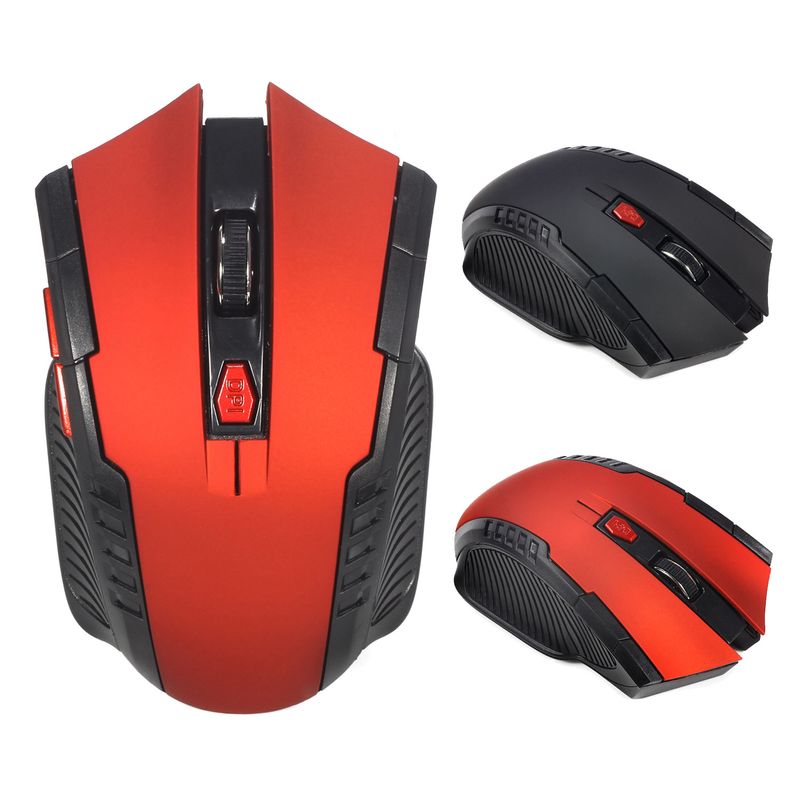
A882 6-key 2.4G Wireless 1600dpi Office Mouse Suitable For Desktop Laptop In Stock Wholesale
HUF7,510.89HUF12,123.42
Szín : Piros


Mennyiség :
 Customer Service
Jelentés
Tartalmazza a szerzői jogok megsértésétIngyenes normál kiszállítás. Lásd a részleteket
Becsült értéke Sun, May 17 és Tue, May 26 között
A terméket az átvételtől számított 30 napon belül visszaküldheti. Lásd a részleteket
Vásároljon bizalommal

Pénz-visszafizetési garancia
Kapja vissza a megrendelt terméket vagy a pénzét. További információ
About this item
Forrás: CoreBox
Seller assumes all responsibility for this listing.Cikkszám: 33485228
Item specifics
Jellemzők
Mixed Light, Matte, Other
Tengely
Optikai tengely, zöld tengely, tea tengely
Numerikus billentyűzet
Nem, igen
Kapcsolat
Vezeték nélküli
Méret
<100Mm, >130Mm, 100Mm-120Mm
Item description from the seller
Basic information:
Mini adapter plug and play
Wireless transmission, long sensing distance up to 10-15 meters
Taşınabilir ve hafif, taşıması ve saklaması çok kolay
Pover switch to save pover
6 keys are available, including a scroll wheel, page forward and page backward buttons, which are convenient for browsing the internet
Operating distance up to 10 meters
Product Specification:
IC model: MX8650
Return Rate: 250 Hz
Movement speed: 28 IPS
Refresh Rate: 3000 FPS
Acceleration: 10 G
Resolution: 800DPI, 1200DPI, 1600DPI adjustable
Color: Black, Red
Power Supply: 2 x AAA Batteries Not Included
Mouse type: Wireless Optical Mouse
Interface: USB
Size: 10.3 * 6.4 * 3.8cm
Net weight: 64g
Package size: 10.5 * 8.5 * 4.7cm
Gross weight: 94 g
Patskage includes:
1 x 2.4GHz Wireless Portable Optical Mouse Battery not included
1 x USB receiver
System Requirements:
Windows98/Me/2000/XP/Vista/Win7/Win8/win10/Win11 or Mac latest
Three-level power saving mode:
1: Three sets
cond into the first sleep light flash
hing continuously
2: After about 1 minute, it enters secondary sleep mode with intermittent flashing lights
3: After about 8 minutes, go to level 3 sleep, the light goes out
How to use:
1: First, open the back cover of the mouse, take out the USB receiver, and insert it into the USB port of the computer
2: Then install the AAA battery, turn on the power switch, and it can be used
3: Note: This mouse requires 2*AAA batteries. AAA batteries are not included


Videos
Videos for this product

 4.4 az 5-ből 9,249 vélemény alapján