Egerek

ATK VXE Dragonfly R1 Pro Wireless Gaming Mouse, 48g Lightweight, PixArt PAW3395 Sensor, Adjustable DPI, Dual-Mode 2.4G/Wired (R1 Pro, Black)

100% Original New Logitech G502 HERO Wired Mouse Pink Gaming Mouse 25600DPI Esports Mouse RGB Nebula Series

VGN Dragonfly F1 Pro Wireless Gaming Mouse - 49g Ultra-Lightweight, 26K DPI Optical Sensor, 6 Programmable Buttons, 65Hrs Battery, Esports Grade - Cla
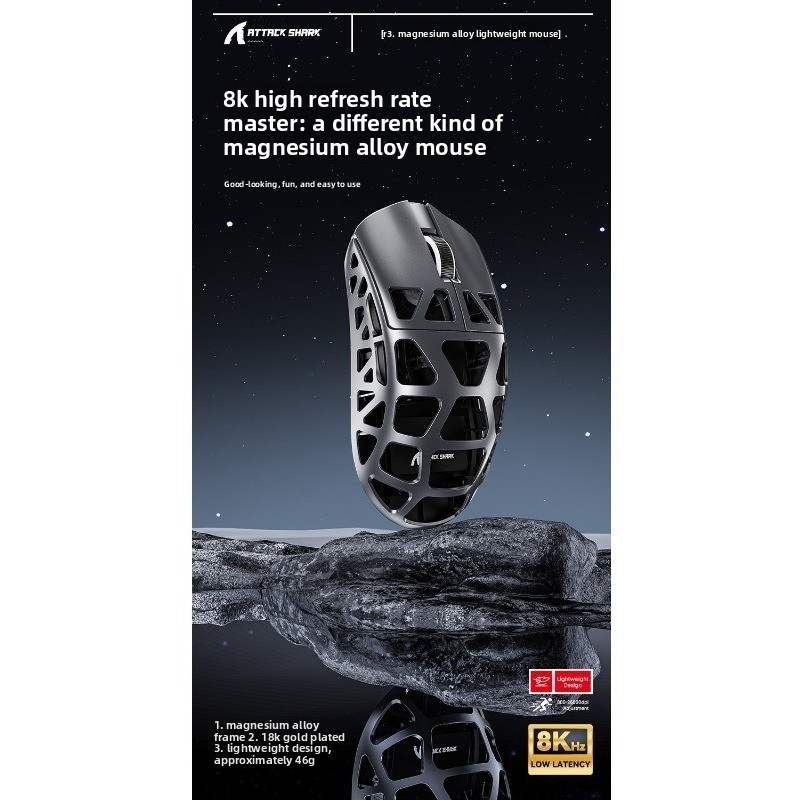
Attack Shark/Attack Shark R3 3395 Magnesium Alloy Wireless Mouse Game E-sports Special Boys Gift

Wireless Gaming Mouse, 2.4G Ergonomic Optical Mouse With 6 Buttons, 2500 DPI Adjustable, 4-Way Scroll Wheel, Compatible With Laptop & PC

EWEADN Wireless Gaming Mouse, Ergonomic Shell Design With Rechargeable Battery, High-Precision Optical Sensor & Lag-Free Performance

Logitech M186 Wireless Symmetrical Mouse For Office Laptop/Desktop PC, With 2.4G Receiver

Farfi Wireless Cute Panda Design ABS Mute 2.4G 1200DPI Plug Play Optical Mouse for Desktop

Logitech Lift Ergonomic Bluetooth Wireless Mouse Vertical Mouse Small Mouse Business Office 3 Devices Switch In Seconds

Logitech G304/G305 Lightspeed Wireless Gaming Mouse 6 Programmable Buttons 12000DPI Battery Usb Stock RGB Wireless Mouse
ATK VXE Dragonfly R1 Pro Wireless Gaming Mouse, 48g Lightweight, PixArt PAW3395 Sensor, Adjustable DPI, Dual-Mode 2.4G/Wired (R1 Pro, Black)

Logitech MX Master 3s Wireless Bluetooth Mouse Ergonomic Office Silent Mouse High-end Pearl White With Wireless Receiver

100% Original Logitech G705 Wireless Gaming Mouse Customizable LIGHTSYNC RGB Lighting Lightspeed Wireless Bluetooth Connectivity

ATTACK SHARK G3PRO Mouse Lightweight E-sports Game Three-mode Wireless Bluetooth RGB Seat Charger

Logitech G PRO X SUPERLIGHT 2 Wireless Gaming Mouse G PRO X 2 32000 DPI 5 Programmable Buttons For PC/Mac New HERO 2K Sensor

Ultra-Lightweight Bluetooth & 2.4G Wireless Gaming Mouse, Rechargeable, 4000 DPI, 5-Button Ergonomic Design For PC/Laptop, Silent Clicks

Honeycomb Gaming Mouse – 7200DPI Wired RGB Mouse, 6 Programmable Buttons, Ergonomic Design For PC/Laptop (White/Pink/Black/Blue)

Razer Viper V3 Pro Wireless Esports Gaming Mouse 8K Polling 35K DPI Optical Sensor Gen3 Optical Switches 8 Programmable Buttons

Razer Basilisk V3 Wired Gaming Mouse Gamer 26000 DPI Optical Sensor E-sports With RGB Lighting For PC Laptop

Attack Shark X3 Mouse Lightweight PAW3395 Video Game The Third Mock Examination Wireless Mouse
Navigate Your Options and Choose the Right Mouse for Your Desk
The right mouse can fit your hand and you daily tasks naturally. Some factors that affect your decision when you are shopping will make a real difference. You can confidently select an ergonomic mouse at Voghion to upgrade your working and gaming experience.
Wired or Wireless? How Your Daily Routine Should Decide
A reliable wireless mouse offers a clean setup without cable drag. For a truly minimalist desk, a bluetooth mouse connects directly to modern laptops and tablets, saving a precious USB port.
If you work from multiple devices, a bluetooth keyboard and mouse combo can boom your productivity. However, for tasks demanding absolute, a wired connection is still the steadfast choice.
Shape is Everything: Matching Mouse Designs to Your Natural Grip
A standard mouse might strain your wrist over time. An ergonomic mouse is designed to support your hand’s neutral posture, reducing pressure. For more pronounced relief, a vertical mouse positions your hand in a handshake angle, which many find alleviates discomfort.
The shape must also suit your grip style. A palm grip needs a fuller mouse to rest on, while a fingertip grip often prefers a lighter, smaller design. Buy a mouse pad with wrist rest and you will get the biggest comfort.
Understanding DPI and Polling Rate
DPI (Dots Per Inch) defines sensitivity. A higher DPI means your cursor moves farther with less physical movement. While useful for large monitors, super-high DPI isn’t always better.
Many professionals prefer a moderate DPI for precision work. Look for a DPI mouse with an on-the-fly adjustment button. This lets you switch between a slow, precise DPI for editing and a faster one for navigation instantly.
From Quiet Clicks to Custom Buttons
Your specific tasks should guide your feature choice. A designer might need extra programmable buttons for shortcuts, while an office worker might prioritize silent clicks.
A gaming mouse brings features like high polling rates for instant response and durable switches. If you need a smoother network, we also offer wireless router for business.
Setting Up for Success: Final Adjustments
Pairing a responsive mouse with a smooth, textured gaming mouse pad can enhance control. For a unified aesthetic, a sleek white one on a clean desk looks sharp and modern.
Finally, ensure compatibility. A usb-c mouse with a modern connector is future-proof for newer laptops. If you’re left-handed, deliberately seek out a symmetrical or a true left handed mouse for a comfortable, natural fit from day one.